Call Conversions measuring how many calls turn into sales
Track the percentage of calls that end in a sale or subscription, and use it to spot issues with leads, agent performance, or the offer itself.
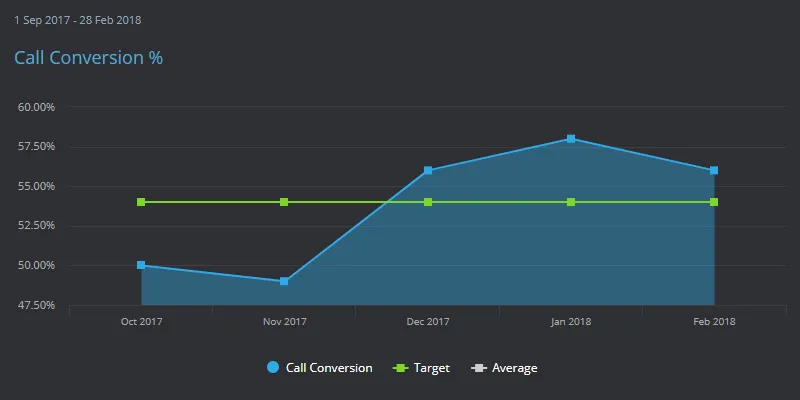
What are call conversions?
Call conversions are the percentage of calls made or received by an agent that end in a successful outcome, such as a sale or subscription. Call conversions are usually tracked as a percentage, though ratios work just as well.
Call conversions reflect how well every stage of the sales funnel is performing, from the number of leads and calls made, to the number of decision-makers reached, through to the final close. They can also be tracked as the result of a specific sales campaign that generates inbound calls.
Sales calls have a reputation that makes many people wary, but this channel can still be an effective source of revenue. Tracking call conversions can highlight problems with data quality, agent performance, or even the appeal of the product itself.
Increasing call conversion rates
Improving call conversion rates can have a big impact on revenue, which is why it's worth monitoring closely:
- If you're not tracking each stage of the sales funnel from lead to close, you only get a partial view of where things are breaking down. Segment and track each stage separately.
- Improve the number of decision-makers in your data. This takes some data cleansing, but it pays off, since agents can spend up to 90% of their time simply identifying and reaching the right people.
- Use pre-call "warm ups", like an introductory email, to help confirm decision-makers and make the call feel less intrusive when it comes.
How to calculate Call Conversions
Call conversion rate is the number of calls that ended in the outcome you count as a success, divided by the calls handled in the same period, then multiplied by 100: (Converted Calls / Calls Handled) x 100.
Converted Calls is every call with a recorded successful outcome, such as a sale, subscription or booking, credited to the call that produced it. Calls Handled is every call an agent actually connected and worked in that same period. On outbound work, decide once whether the denominator is dials or connections, and never mix the two on one chart.
A worked example
Say an outbound team connects 800 calls in a week and logs 96 sales. That is 96 divided by 800, or 0.12, so the conversion rate is 12%. Split the same week by campaign and the picture changes: 60 sales from 300 renewal calls is 20%, while 36 sales from 500 cold calls is 7.2%. The 12% average describes neither list.
The denominator matters just as much. If the team dialed 2,400 numbers to get those 800 connections, conversion on dials is 4%. Same 96 sales, two defensible rates, so label which one you are reading. The figures here are illustrative.
How to improve Call Conversions
- Split the rate before you judge it. Break conversions out by campaign, list source and hour of day first, and by agent second. Gaps that look like agent gaps often turn out to be list gaps.
- Tighten the outcome codes. If an agent can close a call as "other", the rate is a guess. Use a short list of mutually exclusive outcomes and require one on every call.
- Measure conversions per lead, not only per call. Set a minimum number of attempts before a lead is retired. Plenty of sales land on the second or third contact and stay invisible if you only count calls.
- Review the first thirty seconds. Sample a few converted and a few lost calls each week and compare the openings. The difference is usually the qualifying question, not the pitch.
- Staff the hours that convert. If afternoon conversion runs well above morning conversion on the same list, that is a scheduling problem you can fix this week.
What Call Conversions does not tell you
- A high rate can mean low effort. An agent who works only the easiest leads posts a fine percentage on very few calls. Read it beside total answered calls and the raw conversion count, or you reward cherry-picking.
- The rate can rise while sales fall. When list quality drops, connections fall faster than sales do, and the percentage improves on its own. Keep the conversion count on the same chart as the rate.
- Pressure on speed shows up here. Push a team hard on call handle time and calls end sooner, which costs conversions. Treat a move in one as a question about the other.
- A conversion is not yet revenue. Cancellations, refunds and failed first payments unwind some of them. Run a second version of the KPI at 60 or 90 days that counts only the sales that stuck.
Frequently asked questions
What is a good call conversion rate?
There is no universal figure. Inbound calls from people who asked to be contacted convert far better than cold outbound dials, and price and list quality move the number further. Set a baseline from four to eight weeks of your own data and improve on that. Kip, the built-in AI, offers indicative benchmarks, but those are AI estimates, not peer data.
What is the difference between call conversion rate and close rate?
Call conversion rate uses calls as the denominator, so every attempt counts. A close rate, sometimes called closing efficiency, usually uses quotes or qualified opportunities, which are far fewer, so it reads much higher. One measures the call, the other measures the deal.
Should abandoned calls count in the denominator?
No. A call that never reached an agent was never a chance to convert, so counting it measures your queue rather than your selling. Track abandoned calls as a separate KPI and keep this denominator to calls actually handled.
How do you track call conversions in SimpleKPI?
Feed in two numbers per period, converted calls and calls handled, then use a calculated KPI for the percentage. Data arrives by spreadsheet import, integration or the API, and a separate KPI per team or campaign costs nothing extra because the flat price includes unlimited KPIs. SimpleKPI is $79 a month flat, or $63 billed annually ($758 a year), with a 14-day free trial and no credit card.
Track Call Conversions alongside the rest of your call center metrics on SimpleKPI's KPI dashboards, or start from the call center KPI template, then see the whole set on the customer service KPI dashboard example. Pay one flat price: $79 a month for unlimited users and KPIs.