Agent Days Worked tracking workload across your call center team
See how many days, weeks, or months each agent has worked over a period, and use it to keep workloads fair and spot early signs of burnout.
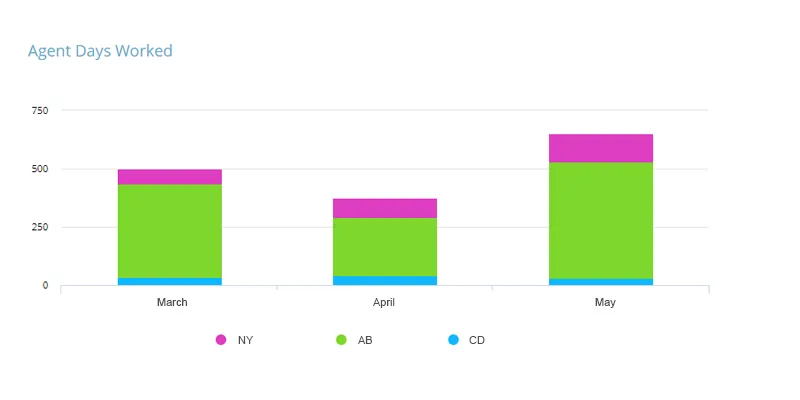
What are Agent Days Worked?
Agent Days Worked is the number of days, weeks, or months an employee worked during a given period. It's a useful KPI for monitoring and improving employee performance, and for gauging resourcing and workload.
It isn't the same as Agent Absenteeism. To understand your workforce properly, look at the extra work or workload agents are taking on, not just the days they're missing.
Historically, call center staff logged the outcome of each phone call along with an estimated handling time. With the rise of social media, email, and live chat, agents now cover a much wider range of communication channels, each with its own characteristics. These differences can add to an agent's workload and, in turn, to the number of days they end up working.
Alongside days worked, it's worth tracking the specific tasks and activities an agent handles within a day. Combining Occupancy Rate, Agent Days Worked, and a breakdown of activities gives a fuller picture of agent productivity.
Improving call center efficiency
Rising channel complexity and expectations can bring down productivity if an agent works at an excessive rate for too long. Punctuality can suffer, and absenteeism can rise as a result.
It isn't always easy to see how workload is affecting productivity, but tracking this KPI can help you:
- Spot the points where employees are consistently overworked across hours, days, or months.
- Recognize when it's time to bring on more people.
- Track occupancy rate alongside Agent Days Worked for a fuller picture of workload and productivity.
How to calculate Agent Days Worked
Take the working time an agent put in over the period and divide it by the length of a standard working day: Agent Days Worked = Total Hours Worked / Standard Working Day in Hours. Counting whole shifts works, but the hours version handles part days and overtime without rounding them away.
Total Hours Worked is on-duty time in the period, overtime and weekend shifts included, with vacation, sick days and unpaid leave excluded. Standard Working Day in Hours is whatever your contracts set, usually 7.5 or 8. The result is days for one agent. Sum it across the team for a department figure, and read it against Scheduled Days, the days the schedule planned for.
A worked example
Say an agent is contracted to a 7.5 hour day and the month holds 21 scheduled working days. That is 157.5 planned hours. The time system records 172.5 hours on duty. Divide by 7.5 and you get 23 Agent Days Worked, two days more than the schedule asked for.
Now scale it up. Ten agents, 21 scheduled days each, so 210 planned days. The team logs 218. Eight extra days spread across ten people sounds harmless, until the per-agent list shows three agents carrying six of them and one at 24 days for the third month running. The team number was fine. That agent is not.
How to improve Agent Days Worked
- Publish the per-agent figure every month. A ranked list makes drift visible in seconds, and the people quietly absorbing extra shifts stop being invisible.
- Schedule from forecast contact volume, not headcount. Email, chat and social each carry their own handling profile, so a schedule built on call volume alone under-staffs the week and pays for it in extra days.
- Cap the extra days, and publish the cap. Pick a ceiling that fits your contracts and your cover, then make anything past it need a manager's sign-off. Ceilings hold better than good intentions.
- Rotate the unpopular shifts. Evenings, weekends and public holiday cover drift toward the same willing few, and a published rotation spreads them without anyone having to volunteer.
- Cut the work that creates the extra days. Repeat contacts, rework and slow tooling all add hours. Improving First Call Resolution removes work that no schedule change can.
What Agent Days Worked does not tell you
- A day counts the same whether it ran four hours or eleven. This is an attendance measure, not an effort one. Read it next to Occupancy Rate and Call Handle Time to see what actually filled those days.
- Team totals hide the person you need to find. Overload shows up in one agent's row, never in the department average. Always break the number down per agent.
- It says nothing about quality. More days worked with falling Customer Satisfaction is a worse month than fewer days and steady scores.
- Fewer days is not automatically good news. A short month, heavy vacation cover and an under-staffed team all pull the number down for different reasons. Check scheduled days before reading anything into a dip.
Frequently asked questions
What is a good number of Agent Days Worked?
There is no universal benchmark, because the figure depends on your contracted day, your shift pattern and the length of the month. The target that matters is parity with scheduled days, and consistent overshoot points to a staffing gap rather than a performance problem.
Is Agent Days Worked the same as absenteeism?
No. Absenteeism counts the days an agent should have worked and did not. Agent Days Worked counts the days actually worked, extra ones included, so it catches the overloaded agent an absence report never shows.
How do you count part days, overtime and weekend shifts?
Divide total on-duty hours by your standard working day, so a four hour shift on an eight hour day counts as half a day. Overtime and weekend shifts count as worked time; vacation, sick leave and unpaid leave do not.
Which KPIs should you track alongside Agent Days Worked?
Occupancy Rate, to see how much of each day went on live work, and handle time or answered calls, to see what came out of it. Add a quality measure such as Customer Satisfaction, because days worked alone tells you load and cost, never value.
Track Agent Days Worked alongside the rest of your call center metrics on SimpleKPI's KPI dashboards, or start from the call center KPI template, then see the whole set on the customer service KPI dashboard example. Pay one flat price: $79 a month for unlimited users and KPIs.