
In making KPIs simple for businesses of every size, I've learned that the right KPIs usually tell you the truth about a big investment long before the board pack does. An AI voice agent is a perfect example: the board pack glows because the AI handles more calls every month, but five plain KPIs show whether it's actually paying its way. Those are total monthly cost against the forecast, callers who ring back within 7 days, the agent hours it freed and where they went, problems fixed without the customer chasing, and overtime and hiring.
And right now, the typical AI voice agent business case leaves most of those out, while putting a very confident forecast right at the front.
Speaking as someone who builds KPI software, I think I know why. The forecast saving is one big, exciting number, and it fits nicely on a slide. The KPIs that show where the saving went are quieter, take a little setting up, and rarely make it into the pitch, which is a shame, because they're the ones that tell you whether it worked.
In March 2025, Gartner predicted that by 2029 agentic AI will resolve 80% of common customer service issues without a person, "leading to a 30% reduction in operational costs".
That's a big number, and it's turning up in a lot of board packs as if it were already money in the bank.
So let's talk about where that saving actually goes, because it rarely arrives as a smaller bill without somebody making a deliberate decision about it.
I'll keep things nice and simple, with some plain math, the five KPIs I'd track, a few questions to ask before anyone signs, and a free spreadsheet so you can try the whole thing with your own numbers.
In this post:
- What makes an AI voice agent a white elephant
- The three places the saving can go
- What the research says about where it went
- The math: saving on paper vs saving in the bank
- What it looked like in our modeled example
- Decide up front: cutting cost or improving service?
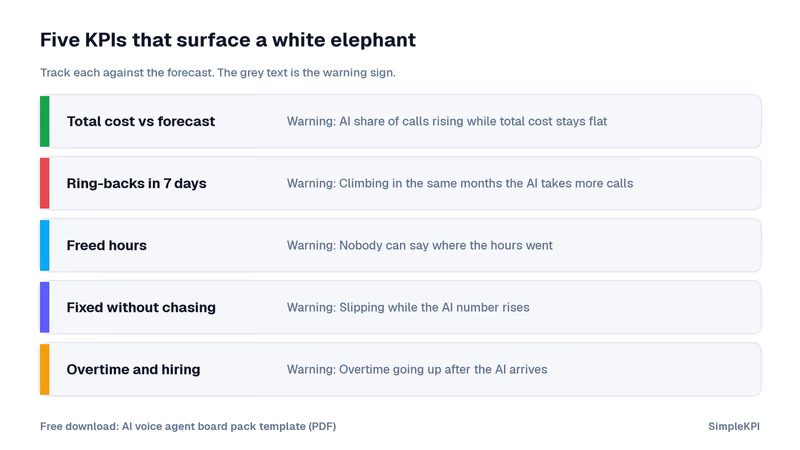
- The five KPIs that surface a white elephant
- Questions to ask before you sign off the business case
What makes an AI voice agent a white elephant
A white elephant is a possession that's expensive, looks impressive, costs a lot to keep, and is surprisingly hard to get rid of once everyone has seen it.
An AI voice agent can turn into one more quickly than you'd think, and here's how it usually looks:
- The board pack glows: more calls are handled by the AI every month, and every chart in the pack points in the right direction.
- The phones tell another story: customers who didn't get what they needed ring back the next day, and those repeat calls land on your team anyway, often with an irritated customer on the other end.
- The bill doesn't shrink: the AI fees are new, the team is roughly the same size, and the finance director can't find the saving anywhere.
- Nobody wants to switch it off: there's a contract, a launch announcement and a great deal of internal goodwill riding on it.
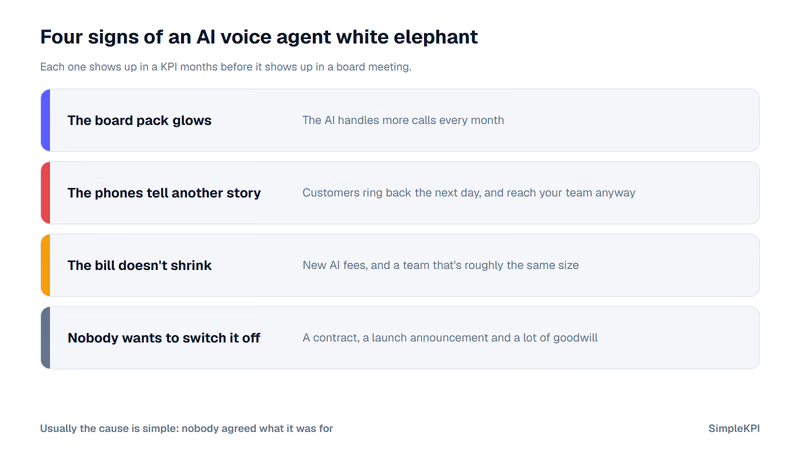
None of that means the AI is bad, and it usually means something much simpler: nobody agreed what it was actually for.
The good news is that every one of those signs shows up in a KPI months before it shows up in an awkward board meeting, and I'll cover the five that matter further down.
The three places the saving can go
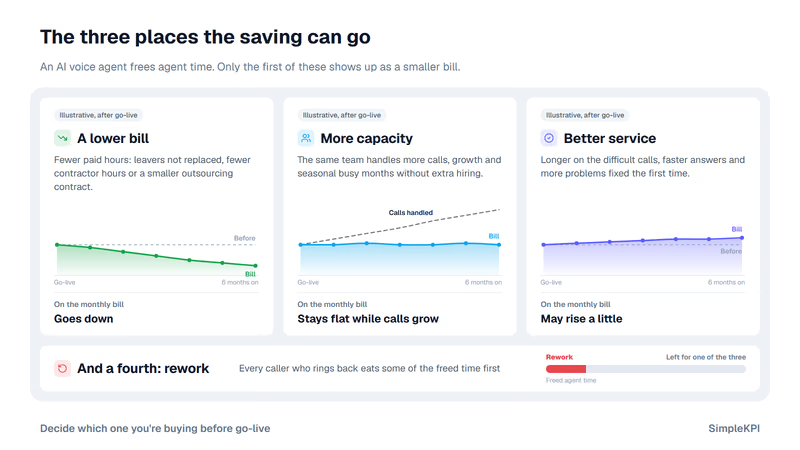
When an AI voice agent takes calls off your team, it frees up agent time, and that freed time can only go to one of three places.
- A lower bill: you need fewer paid hours, so you replace fewer leavers, reduce contractor hours or shrink an outsourcing contract.
- More capacity: the same team handles more calls, or copes with growth and seasonal busy months without extra hiring.
- Better service: agents spend longer on the difficult calls, answer the phone faster and fix more problems the first time.
All three are perfectly good results, but only the first one shows up as a smaller number on the monthly bill.
And there's a fourth place that nobody puts in the business case, which is rework. Every caller who rings back after an unhelpful AI call eats some of the freed time before it goes anywhere useful.
What the research says about where it went
I'll be honest, I expected the forecasts to be a little ahead of reality, but I didn't expect the published research to paint quite such a clear picture.
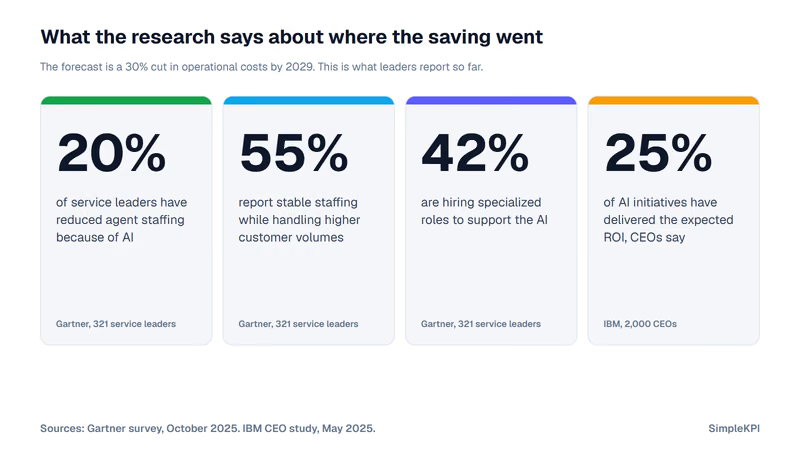
In a Gartner survey of 321 customer service leaders in October 2025, only 20% had reduced agent staffing because of AI. 55% reported stable staffing while handling higher customer volumes, which is the saving going into capacity rather than the bill.
The same survey found 42% were hiring specialized roles, such as AI strategists and conversational AI designers, to support the AI. That's a real cost, and it's an easy one to leave out of the original forecast.
A later Gartner release from the same survey says 63% of service leaders are reducing frontline headcount gradually through attrition, while 85% are adding new tasks to agent roles. Gartner's Eric Keller put the choice neatly: leaders "must decide whether to simply do the same work at lower cost or to redeploy human agents into roles that AI cannot replace and that customers value most."
And for those who did cut, Gartner predicts that by 2027, half of the companies that put headcount reductions down to AI will rehire staff to do similar work under different job titles.
There's a real example of how that plays out, too: in August 2025, Commonwealth Bank of Australia reversed 45 customer service job cuts that it had announced while introducing an AI voice bot. The union said call volumes were rising, with managers offering overtime and team leaders pulled onto the phones, and the bank admitted it "should have been more thorough in our assessment of the roles required".
Zoom out, and it isn't just a call center problem either, because the chief executives in IBM's 2025 study of 2,000 CEOs said only 25% of AI initiatives had delivered the expected ROI over the last few years.
The math: saving on paper vs saving in the bank
I get that math in a blog post can feel like homework, but trust me, this bit is short, and the numbers are made up purely for illustration.
Picture a call center that takes 50,000 calls a month, where each call handled by a person costs around $8 in agent time once you include wages, benefits and supervision. That's an agent bill of $400,000 a month.
The business case says the AI will handle 30% of those calls, which works out at 15,000 a month.
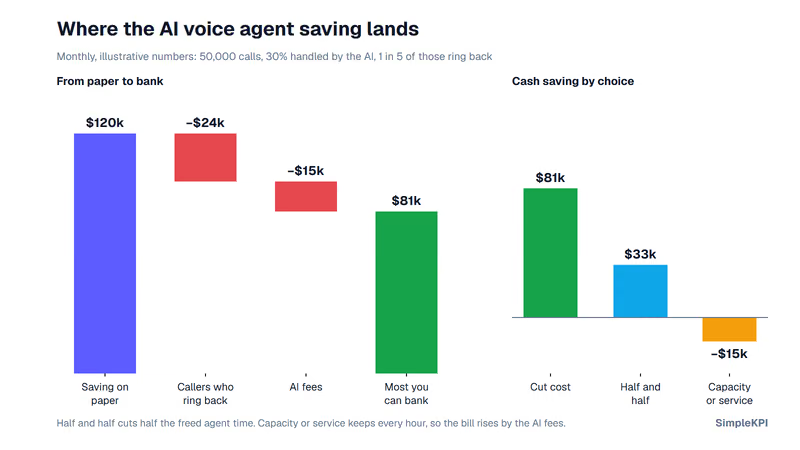
- Saving on paper: 15,000 calls at $8 each is $120,000 a month, and that's the number that usually goes in the board pack. It's 30% of the agent bill, the same as the Gartner headline.
- Callers who ring back: say 1 in 5 of those callers ring back and reach a person. That's 3,000 calls, or $24,000 of agent time, straight back on the team.
- AI fees: at $1 for each call the AI handles, that's another $15,000 a month on the invoice.
So the most you could possibly bank is $81,000 a month, and you only get that if every single freed hour actually comes off the payroll.
If you keep every agent and use the time to answer faster and fix more problems, the bill goes up by $15,000. That might be a great decision for your customers, but it isn't a saving.
Split the difference, reducing half the freed time and keeping the other half for service, and you bank $33,000 a month.
| What happens to the freed time | Banked each month | Monthly bill |
|---|---|---|
| The business case on paper | $120,000 | 30% lower |
| All of it comes off the payroll | $81,000 | 20% lower |
| Half comes off, half goes into service | $33,000 | 8% lower |
| Every agent stays | −$15,000 | 4% higher |
Same AI, same calls, and three very different answers for the finance director. Not one of them is the 30% in the board pack.
What it looked like in our modeled example
We tried this out on a modeled call center for one of our dashboard examples, so none of the figures belong to a real business, but the pattern is exactly the one above.
Cost per call fell by 10%, yet the monthly bill ended up 2.5% higher, because most of the freed time went into answering the phone on time. You'll find the full story on our call center KPI dashboard example.
Decide up front: cutting cost or improving service?
This is the single decision that stops an AI voice agent becoming a white elephant, and it needs making before go-live, not after the first awkward board meeting where the saving can't be found.
| If you're buying | Success on the bill looks like | Success on the phones looks like | Watch out for |
|---|---|---|---|
| A lower bill | Total monthly cost goes down | Service holds steady | Callers who ring back quietly eating the saving |
| More capacity | Cost stays flat while calls grow | Busy months are handled without hiring | Nobody noticing the growth you absorbed |
| Better service | Cost may rise a little | Faster answers and more problems fixed first time | A business case that promised cuts as well |
If it were my phone line, I'd pick better service first, and I'd measure it honestly. Once the ring-back KPI had settled down for a few months, I'd know what the AI really handles, and that's the moment to talk about cutting cost. Cutting first and measuring later is a bit like buying the smaller jeans before you've stepped on the scales.
Tip: Write the choice on the first page of the business case, in a single sentence, so nobody can quietly change the definition of success later.
The five KPIs that surface a white elephant
A rising AI number on its own tells the board that the AI is busy, but it doesn't tell them whether the business is actually better off.
So here are the five KPIs I'd put in the board pack every month, each showing the original forecast, the actual result and one line explaining why they differ. I've added the warning pattern for each, which is what it looks like when the elephant moves in:
- Total monthly cost vs forecast: the whole cost of the service each month, not just cost per call. Warning sign: the AI's share of calls keeps rising while the total cost stays flat or creeps up.
- Ring-backs within 7 days: customers who call again within a week of an AI call. Warning sign: it climbs in the same months the AI takes on more calls.
- Freed hours and where they went: the agent hours the AI gave back, split into lower cost, more capacity and better service. Warning sign: nobody can say where the hours went.
- Problems fixed without chasing: the share of customers whose problem was sorted without them having to come back or complain. Warning sign: it slips while the AI number rises.
- Overtime and hiring: overtime hours, hires and leavers since go-live. Warning sign: overtime goes up after the AI arrives, which is exactly what the union described at Commonwealth Bank.
Tip: Start tracking all five in the month before go-live, so you have an honest starting point to compare against.
If you track these in SimpleKPI, you can schedule a KPI report that emails all five to the board every month, so they see the same numbers without having to log in.
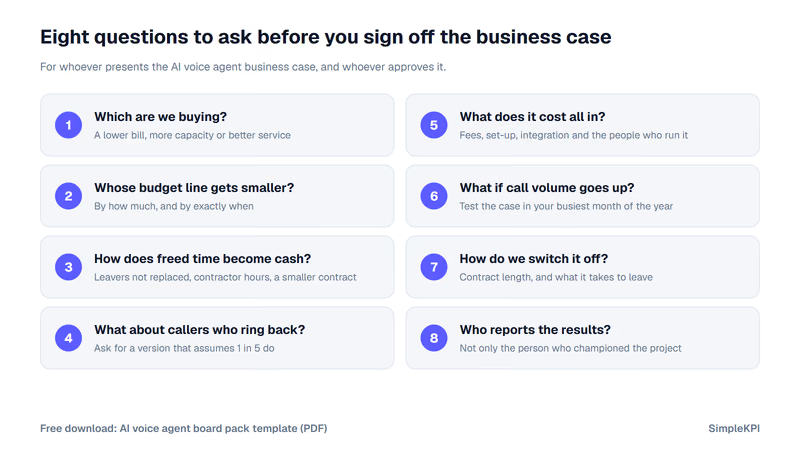
Questions to ask before you sign off the business case
This is the part I'd print out and take into the meeting, whether you're the one presenting the business case or the one approving it.
- Which are we buying? A lower bill, more capacity or better service, and it's important to pick just one.
- Whose budget line gets smaller? Ask by how much, and by exactly when.
- How does freed time become cash? It might be leavers not replaced, fewer contractor hours or a smaller outsourcing contract, but if the answer is vague, the saving probably is too.
- What does the forecast assume about callers who ring back? If it assumes nobody does, ask for a version that assumes 1 in 5.
- What does it cost all in? Fees, set-up, integration and the people needed to run and tune it.
- What happens if call volume goes up? Ask how the business case holds up in your busiest month of the year.
- How long is the contract, and what does it take to switch it off? This is the white elephant question.
- Who reports the results? Ideally it shouldn't only be the person who championed the project in the first place.
Tip: Run question 4 through the free spreadsheet below, because if the business case only works when nobody rings back, that's definitely worth knowing before you sign.
Free downloads:
- AI voice agent business case (Excel): enter your calls, costs, AI share and ring-backs, pick cut cost, add capacity or improve service, and see where the saving lands, with a 12-month tracker for the five KPIs included.
- AI voice agent board pack template (PDF): the five KPIs with their warning signs, the eight questions and a six-monthly white elephant check, on one page.
It's not the AI, it's the decision
AI voice agents can do a great job, and a lot of the freed time ends up somewhere genuinely useful for customers.
The trouble starts when the board is told it's buying a lower bill and the business quietly gets better service instead. Both are perfectly fine outcomes, but only one of them was in the forecast, and without the five KPIs above, nobody finds out until the bill arrives.
One last thought: if you're writing or reviewing one of these business cases right now, try your own numbers in the spreadsheet first. And if you'd like to track the five KPIs on a live dashboard, you can try SimpleKPI free for 14 days.

The goal (lower bill, more capacity or better service), whose budget line falls and when, how freed time becomes cash, an assumption for callers who ring back, all-in costs, a busy-month test, contract length and exit, and who reports results.
Five, tracked monthly against the forecast: total monthly cost (warning: AI share rising while cost stays flat), ring-backs within 7 days (climbing as the AI takes more calls), freed hours and where they went (nobody can say), problems fixed without chasing (slipping), and overtime and hiring (overtime up after go-live).
Decide before go-live and write it on page one. Cutting cost means paid hours must fall; improving service means the bill may rise while answers get faster and more problems are fixed first time; capacity means absorbing growth without hiring.
It's expensive, looks impressive in reports, costs a lot to keep, and is hard to switch off, usually because nobody agreed upfront what it was meant to deliver.
Turn KPIs like these into KPI monitoring in one live feed, and pay one flat price: $79 a month for unlimited users and KPIs. There is a 14-day free trial, no card needed.